> ## Documentation Index
> Fetch the complete documentation index at: https://docs.datadash.xyz/llms.txt
> Use this file to discover all available pages before exploring further.
# Holders
> Who holds an event's outcomes, with per-wallet totals and outcome-level detail.
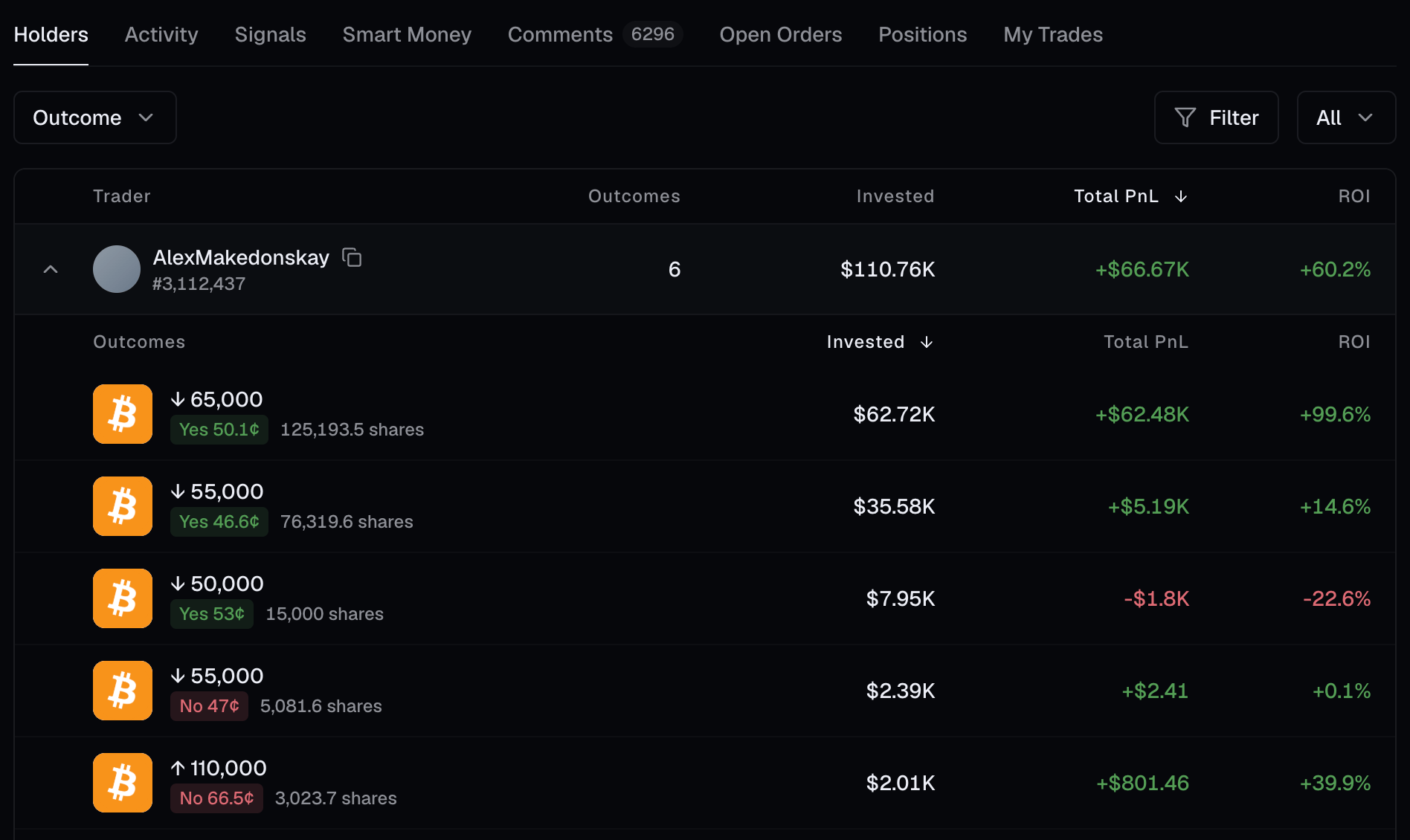
Holders answers "who is in this event, and how are they doing?" Each row is **one wallet's position across an entire event** — what they put in, what it's worth, and their PnL — with the individual outcomes they hold nested inside the row.
That nesting is what lets a client render a collapsed leaderboard and expand any trader to reveal the outcomes behind their number, without a second request.
 ## Three views
| Endpoint | Returns |
| ------------------------------------ | -------------------------------- |
| `POST /api/v1/market-holders/all` | Every position, open and closed. |
| `POST /api/v1/market-holders/active` | Only currently-held positions. |
| `POST /api/v1/market-holders/closed` | Only exited positions. |
They share a shape, but not every column appears on all three — `currentValue` is absent from `closed`, since an exited position has none. The table below marks where each column applies.
## Columns
| Column | Meaning |
| ------------------- | ---------------------------------------------------------- |
| **`userId`** | The wallet. |
| **`outcomes`** | How many distinct outcomes this wallet holds in the event. |
| **`invested`** | Total USD put in. |
| **`currentValue`** | Current market value of what's still held. *(all, active)* |
| **`totalPnl`** | Realized plus unrealized PnL, in USD. |
| **`unrealizedPnl`** | PnL on positions still open. *(all only)* |
| **`pnlPercentage`** | Return on investment, as a percentage. |
| **`volume`** | Total traded volume. *(all, closed)* |
| **`tokenMetadata`** | The per-outcome breakdown — see below. |
## Outcome-level detail
`tokenMetadata` is an array, one entry per outcome the wallet holds:
| Field | Meaning |
| --------------------- | ------------------------------------------- |
| `tokenName` | The outcome's name. |
| `isYesToken` | Whether this is the Yes side. |
| `avgBuyingPrice` | Average entry price. |
| `total_bought_shares` | Shares acquired. |
| `invested` | USD put into this outcome. |
| `totalPnl` | PnL on this outcome. |
| `unrealizedPnl` | PnL on the part still held. *(all, active)* |
| `pnlPercentage` | ROI on this outcome. |
| `volume` | Traded volume on this outcome. |
| `marketId` | The market this outcome belongs to. |
| `marketClosed` | Whether that market has closed. |
Every value inside `tokenMetadata` is a **string**, including the numeric and boolean ones — `"invested": "30740.5"`, `"isYesToken": "true"`. Parse them before use. The top-level columns are properly typed; only this nested payload is string-encoded.
## Scoping the query
Holders is always scoped to an event, so **`eventId` is required**.
```json theme={null}
{
"page": { "limit": 50 },
"filter": [
{ "field": "eventId", "operator": "eq", "value": 1234 }
],
"orderBy": [{ "field": "totalPnl", "direction": "desc" }]
}
```
Omitting it returns `400`.
## Narrowing further
Beyond `eventId`, you can filter on `userId`, `positionId`, `userRank`, and the numeric measures — `invested`, `totalPnl`, `unrealizedPnl`, `pnlPercentage`, `currentValue` and `volume`. See [Filtering](/filters) for the syntax.
Whales with a losing position, for example:
```json theme={null}
{
"page": { "limit": 50 },
"filter": [
{ "field": "eventId", "operator": "eq", "value": 1234 },
{ "field": "invested", "operator": "gte", "value": 100000 },
{ "field": "totalPnl", "operator": "lt", "value": 0 }
],
"orderBy": [{ "field": "invested", "direction": "desc" }]
}
```
Or restrict to a [cohort](/cohorts) of wallets you already track:
```json theme={null}
{
"page": { "limit": 50 },
"filter": [
{ "field": "eventId", "operator": "eq", "value": 1234 },
{ "field": "userId", "operator": "inCohort", "value": ["01HQ2K..."] }
]
}
```
Holders has no `searchKey` — it's already scoped to one event, so there's nothing to search across. Use the [Activity](/activity) endpoint to find an event by name first.
## API endpoints
`POST /api/v1/market-holders/all`
`POST /api/v1/market-holders/active`
`POST /api/v1/market-holders/closed`
## Three views
| Endpoint | Returns |
| ------------------------------------ | -------------------------------- |
| `POST /api/v1/market-holders/all` | Every position, open and closed. |
| `POST /api/v1/market-holders/active` | Only currently-held positions. |
| `POST /api/v1/market-holders/closed` | Only exited positions. |
They share a shape, but not every column appears on all three — `currentValue` is absent from `closed`, since an exited position has none. The table below marks where each column applies.
## Columns
| Column | Meaning |
| ------------------- | ---------------------------------------------------------- |
| **`userId`** | The wallet. |
| **`outcomes`** | How many distinct outcomes this wallet holds in the event. |
| **`invested`** | Total USD put in. |
| **`currentValue`** | Current market value of what's still held. *(all, active)* |
| **`totalPnl`** | Realized plus unrealized PnL, in USD. |
| **`unrealizedPnl`** | PnL on positions still open. *(all only)* |
| **`pnlPercentage`** | Return on investment, as a percentage. |
| **`volume`** | Total traded volume. *(all, closed)* |
| **`tokenMetadata`** | The per-outcome breakdown — see below. |
## Outcome-level detail
`tokenMetadata` is an array, one entry per outcome the wallet holds:
| Field | Meaning |
| --------------------- | ------------------------------------------- |
| `tokenName` | The outcome's name. |
| `isYesToken` | Whether this is the Yes side. |
| `avgBuyingPrice` | Average entry price. |
| `total_bought_shares` | Shares acquired. |
| `invested` | USD put into this outcome. |
| `totalPnl` | PnL on this outcome. |
| `unrealizedPnl` | PnL on the part still held. *(all, active)* |
| `pnlPercentage` | ROI on this outcome. |
| `volume` | Traded volume on this outcome. |
| `marketId` | The market this outcome belongs to. |
| `marketClosed` | Whether that market has closed. |
Every value inside `tokenMetadata` is a **string**, including the numeric and boolean ones — `"invested": "30740.5"`, `"isYesToken": "true"`. Parse them before use. The top-level columns are properly typed; only this nested payload is string-encoded.
## Scoping the query
Holders is always scoped to an event, so **`eventId` is required**.
```json theme={null}
{
"page": { "limit": 50 },
"filter": [
{ "field": "eventId", "operator": "eq", "value": 1234 }
],
"orderBy": [{ "field": "totalPnl", "direction": "desc" }]
}
```
Omitting it returns `400`.
## Narrowing further
Beyond `eventId`, you can filter on `userId`, `positionId`, `userRank`, and the numeric measures — `invested`, `totalPnl`, `unrealizedPnl`, `pnlPercentage`, `currentValue` and `volume`. See [Filtering](/filters) for the syntax.
Whales with a losing position, for example:
```json theme={null}
{
"page": { "limit": 50 },
"filter": [
{ "field": "eventId", "operator": "eq", "value": 1234 },
{ "field": "invested", "operator": "gte", "value": 100000 },
{ "field": "totalPnl", "operator": "lt", "value": 0 }
],
"orderBy": [{ "field": "invested", "direction": "desc" }]
}
```
Or restrict to a [cohort](/cohorts) of wallets you already track:
```json theme={null}
{
"page": { "limit": 50 },
"filter": [
{ "field": "eventId", "operator": "eq", "value": 1234 },
{ "field": "userId", "operator": "inCohort", "value": ["01HQ2K..."] }
]
}
```
Holders has no `searchKey` — it's already scoped to one event, so there's nothing to search across. Use the [Activity](/activity) endpoint to find an event by name first.
## API endpoints
`POST /api/v1/market-holders/all`
`POST /api/v1/market-holders/active`
`POST /api/v1/market-holders/closed`